1. Dashboard
  2. News
  3. Community
    1. Unresolved Threads
  4. Downloads
  5. Blogs
    1. Articles
  6. Lexicon
  7. Members
    1. Recent Activities
    2. Users Online
    3. Team
    4. Search Members
  • Login
  • Register
  • Search
This Thread
  • Everywhere
  • This Thread
  • This Forum
  • Articles
  • Pages
  • Forum
  • Files
  • Lexicon
  • Blog Articles
  • More Options
  1. Flusiboard
  2. Forums
  3. Flight Simulation
  4. Hardware, Software und PC

Hardware funktioniert nicht mehr mit LINDA unter Windows 10 im FSX

    • Software
  • Remo.Pilot
  • January 5, 2020 at 12:01 PM
1st Official Post
  • Remo.Pilot
    New
    Points
    15
    Posts
    2
    Name
    Markus
    Flight Simulator
    FSX
    • January 5, 2020 at 12:01 PM
    • #1

    Hi zusammen!

    Ich bin echt am Verzweifeln: Habe über Weihnachten endlich einen neuen PC in Betrieb genommen und meine FSX-Installation von einem Windows 7 auf einen Windows 10 - Rechner migriert.

    Soweit funktioniert alles: FSX, Add-On-Scenery, feelthere Airbus Evo 1 und 2, AES Base, etc.. ABER:

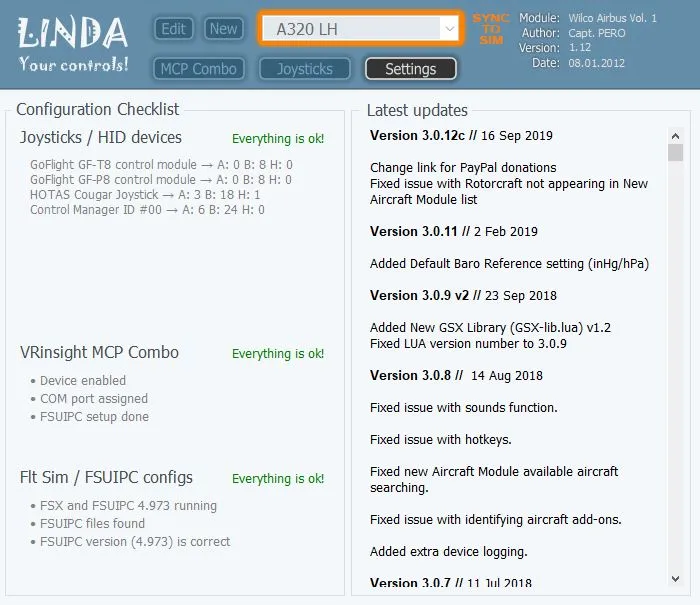
    meine Peripherie-Geräte (Hotas Cougar, CH THrottle Quadrant, GoFlight Module und VRInsight Airbus FCU II) lassen sich nicht mehr im FSX mit LINDA benutzen. Im Linda-Tool (neueste Version 3.0.12c) kann ich sie problemlos konfigurieren und (laut FSX) wird auch die Linda-config-file geladen. Aber keine der Knöpfe, Schalter, etc. funktionieren im FSX. (siehe Screenshots) FSUIPC ist lizensiert und auf der neuesten Version (4.973). Woran kann es jetzt noch liegen ? Ist es ein Problem mit Win10?

    Danke für vorab für Eure Hilfe! ;)

  • Sascha
    Team
    Points
    6,601
    Posts
    908
    Lexicon Article
    52
    Name
    Sascha
    Flight Simulator
    FS2020 X-Plane 12
    • January 5, 2020 at 12:16 PM
    • Official Post
    • #2

    Hi Markus!

    Erst einmal herzlich willkommen hier im Flusiboard! :)

    Quote from Remo.Pilot

    und meine FSX-Installation von einem Windows 7 auf einen Windows 10 - Rechner migriert.

    Was genau kann man sich den hierunter vorstellen? Hast du alles nach und nach manuell neu installiert oder das, was geht, einfach vom alten Verzeichnis des bisherigen PC in das neue Verzeichnis des jetzigen PC rüber kopiert?

    Best Regards,
    Sascha Schreck

    CEO· Editor · Moderator


    flightsim.news - Flight Simulation News Stream

    Flusiboard - The Flight Simulation Community

    FlightSim AdWork - Flight Simulation Advertising

  • Remo.Pilot
    New
    Points
    15
    Posts
    2
    Name
    Markus
    Flight Simulator
    FSX
    • January 5, 2020 at 3:19 PM
    • #3

    Hi Sascha, danke! :)

    Nein, komplette Neuinstallation from Scratch. Alles Andere bringt nichts.

    Habe gerade gesehen: die Werte (z.B Heading Selector vom Autopiloten) werden korrekt vom virtuellen Cockpit an die VRInsight-Konsole übertragen (LED-Anzeige). D.h. der Datenweg FSX --> Hardware scheint zu funktionieren, nicht jedoch umgekehrt. :/

  • Sascha January 9, 2020 at 3:32 PM

    Moved the thread from forum Prepar3D, X-Plane and FSX to forum Hardware, Software und PC.
  • Frank April 25, 2020 at 5:48 PM

    Added the label Software

Participate now!

Don’t have an account yet? Register yourself now and be a part of Flusiboard!

Register Yourself Login
- Ad -

Tags

  • FSX
  • windows 10
  • Linda
  • VRinsight
  • FSUIPC

Who was online today

styleLogo-7129d7fe3ac3ce4456f010930db86abe96525a8e.png

Started in November 2011 as a pure forum for our portal flusinews.de, Flusiboard has grown more and more. Meanwhile it has become an independent portal with a community, downloads, a Lexicon and much more.

News about Flight Simulation

  • All the News
  • FS2020 News
  • Prepar3D News
  • X-Plane News
  • FSX News

Our Community

  • Forums overview
  • Flight Simulation Forums

More

  • Flight Simulation Lexicon
  • Ticket System
  1. Advertise with us
  2. Privacy Policy
  3. Contact
  4. Legal Notice
Powered by WoltLab Suite™