1. Dashboard
  2. News
  3. Community
    1. Unresolved Threads
  4. Downloads
  5. Blogs
    1. Articles
  6. Lexicon
  7. Members
    1. Recent Activities
    2. Users Online
    3. Team
    4. Search Members
  • Login
  • Register
  • Search
This Thread
  • Everywhere
  • This Thread
  • This Forum
  • Articles
  • Pages
  • Forum
  • Files
  • Lexicon
  • Blog Articles
  • More Options
  1. Flusiboard
  2. Forums
  3. Flight Simulation
  4. Prepar3D, X-Plane and FSX

X-Plane 11 Monitor für Screenshot auswählen?

    • X-Plane 11
  • AirXgamer
  • August 7, 2020 at 6:30 PM
  • Thread is Resolved
  • AirXgamer
    Was already active
    Points
    255
    Posts
    45
    • August 7, 2020 at 6:30 PM
    • #1

    Moin,

    Ich würde gerne wissen, ob man irgendwo in X-Plane einstellen kann, von welchem Bildschirm der Screenshot gemacht wird. Ich spiele mit drei Bildschirmen (im Vollbildmodus) und der Screenshot wird immer vom primären Monitor gemacht (also der, wo auch die Einstellungen drauf gemacht werden bzw. das Menü erscheint), nur meist interessiert micht beim Screenshot nicht unbedingt der Bilck aus dem linken Seitenfenster 8).

    Kennt jemand eine Lösung dafür?

    Verwendet wird X-Plane 11.50b17, das Verhalten von 11.4x ist mir diesbezüglich unbekannt, möchte aber auch nicht für das kleine Luxusproblem meine X-Plane Sicherung wieder einspielen ;).

    Gruß

    AirX

    PS: Ich poste später mal noch einen Screenshot dazu....
    X-Plane 11

    i5 6600k@4Ghz 16GB RAM GTX1060 6GB

  • Hueypilot
    Hard to imagine life without
    Points
    14,077
    Posts
    2,328
    • August 7, 2020 at 7:41 PM
    • #2

    Win10 bietet eine einfache kostenlose Lösung.
    Klicke links unten auf deinem Monitor das Windossysmbol
    .. dann
    -Windows Zubehör
    ... dann
    findest du Snipping Tool.

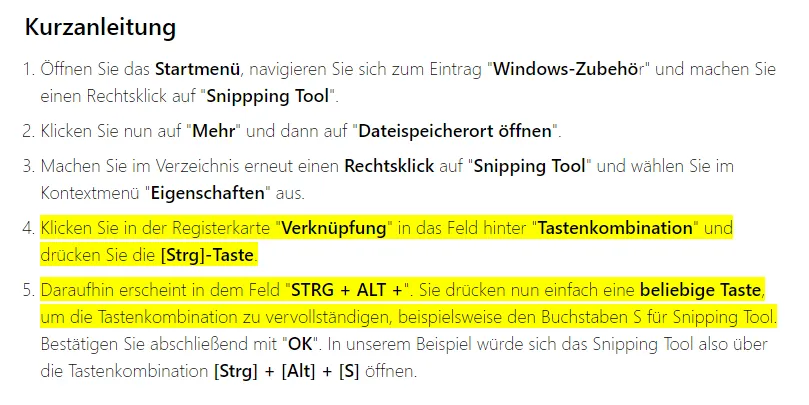
    Das machst du dir unten in deine Schnellstart leiste oder belegst eine Taste und das geht so:

    Guten Flug, Gruß HueyPilot

  • Hueypilot
    Hard to imagine life without
    Points
    14,077
    Posts
    2,328
    • August 7, 2020 at 7:44 PM
    • #3

    Musst du paar Minuten rum experimentieren...
    Es gibt da auch noch einige andere Möglichkeiten, aber die hier fiel mir eben gerade schnell als kostenlose Lösung ein.

    Guten Flug, Gruß HueyPilot

Participate now!

Don’t have an account yet? Register yourself now and be a part of Flusiboard!

Register Yourself Login
- Ad -

Who was online today

styleLogo-7129d7fe3ac3ce4456f010930db86abe96525a8e.png

Started in November 2011 as a pure forum for our portal flusinews.de, Flusiboard has grown more and more. Meanwhile it has become an independent portal with a community, downloads, a Lexicon and much more.

News about Flight Simulation

  • All the News
  • FS2020 News
  • Prepar3D News
  • X-Plane News
  • FSX News

Our Community

  • Forums overview
  • Flight Simulation Forums

More

  • Flight Simulation Lexicon
  • Ticket System
  1. Advertise with us
  2. Privacy Policy
  3. Contact
  4. Legal Notice
Powered by WoltLab Suite™