1. Dashboard
  2. News
  3. Community
    1. Unresolved Threads
  4. Downloads
  5. Blogs
    1. Articles
  6. Lexicon
  7. Members
    1. Recent Activities
    2. Users Online
    3. Team
    4. Search Members
  • Login
  • Register
  • Search
This Thread
  • Everywhere
  • This Thread
  • This Forum
  • Articles
  • Pages
  • Forum
  • Files
  • Lexicon
  • Blog Articles
  • More Options
  1. Flusiboard
  2. Forums
  3. Flight Simulation
  4. Prepar3D, X-Plane and FSX

FlyWithLua XP12 - Öffnen von FlyAgi_Tweak_Utility

    • X-Plane 12
  • FrankEDDB
  • October 7, 2023 at 3:35 AM
  • Thread is Resolved
1st Official Post
  • FrankEDDB
    Team
    Points
    3,381
    Posts
    536
    • October 7, 2023 at 3:35 AM
    • Official Post
    • #1

    Hallo,

    seit dem XP12 Update auf X-Plane 12.07r1, mußte ich auf die aktuelle FlyWithLua Version FlyWithLua_NG_v2.8.10_Lin_Mac_Win aktualisieren und auch die aktuellste Version von FlyAgi_Tweak_Utility (Zombie Studios - Tweak Utility XP12) installieren.

    Nun zu meinem Anliegen.
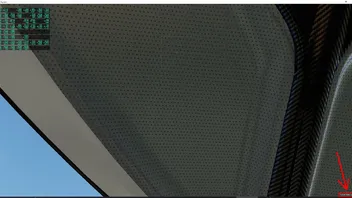
    Im XP12 gibt es ja dann unten rechts den Text Tweak Utility Option wo man bisher durch draufklicken dann das Utility öffnen kann.
    Leider funktioniert dies nicht mehr und ich kann es nur über das XP12 Menü > Plugins > FlyWithLua > FlyWithLua Macros > X-PLANE 12 Tweak Utility öffnen.

    Weiß vielleicht jemand wie man das beheben kann ?

    Und wenn ja, mir das vielleicht erklären ?
    Danke im voraus für Tips / Hinweise. :)

    Mit freundlichen Grüßen

    Frank

    CPU - AMD Ryzen 5 7600X (6x 4,7 GHz, Turbo 5,3 GHz),
    RAM - 64GB (2x 32GB) G.Skill Flare EXPO X5 DDR5-6000,
    GPU - MSI nVidia GeForce RTX 4070 Ti Gaming X Trio 12G,
    interne Datenträger - 2x M.2 SSD + 4x SSD + 2x HDD

    Detaillierte Angaben zu meinem Computer: userbar.png

    • Next Official Post
  • XP-Flusi
    Hard to imagine life without
    Points
    12,356
    Posts
    2,151
    • October 7, 2023 at 12:26 PM
    • #2

    das Tweak Utility war nur für XP11. Es gab den Versuch eines Updates von einem anderen User.

    viele Grüße

    Lothar

  • FrankEDDB
    Team
    Points
    3,381
    Posts
    536
    • October 7, 2023 at 4:14 PM
    • Official Post
    • #3

    Aber in X-Plane 12_12.05r1 läuft ja das Tweak Utility ohne Probleme, auch funktioniert dort das öffnen über das anklicken des Textes unten rechts.

    Mit freundlichen Grüßen

    Frank

    CPU - AMD Ryzen 5 7600X (6x 4,7 GHz, Turbo 5,3 GHz),
    RAM - 64GB (2x 32GB) G.Skill Flare EXPO X5 DDR5-6000,
    GPU - MSI nVidia GeForce RTX 4070 Ti Gaming X Trio 12G,
    interne Datenträger - 2x M.2 SSD + 4x SSD + 2x HDD

    Detaillierte Angaben zu meinem Computer: userbar.png

    • Previous Official Post

Participate now!

Don’t have an account yet? Register yourself now and be a part of Flusiboard!

Register Yourself Login
- Ad -

Who was online today

Users Viewing This Thread

  • 1 Guest

styleLogo-7129d7fe3ac3ce4456f010930db86abe96525a8e.png

Started in November 2011 as a pure forum for our portal flusinews.de, Flusiboard has grown more and more. Meanwhile it has become an independent portal with a community, downloads, a Lexicon and much more.

News about Flight Simulation

  • All the News
  • FS2020 News
  • Prepar3D News
  • X-Plane News
  • FSX News

Our Community

  • Forums overview
  • Flight Simulation Forums

More

  • Flight Simulation Lexicon
  • Ticket System
  1. Advertise with us
  2. Privacy Policy
  3. Contact
  4. Legal Notice
Powered by WoltLab Suite™