1. Dashboard
  2. News
  3. Community
    1. Unresolved Threads
  4. Downloads
  5. Blogs
    1. Articles
  6. Lexicon
  7. Members
    1. Recent Activities
    2. Users Online
    3. Team
    4. Search Members
  • Login
  • Register
  • Search
This Thread
  • Everywhere
  • This Thread
  • This Forum
  • Articles
  • Pages
  • Forum
  • Files
  • Lexicon
  • Blog Articles
  • More Options
  1. Flusiboard
  2. Forums
  3. Flight Simulation
  4. Prepar3D, X-Plane and FSX
  5. Aircraft

PMDG 747 schwarze Flügel/- und Triebwerksteile

    • Prepar3D v4
  • niklas45
  • September 27, 2019 at 11:14 PM
1st Official Post
  • niklas45
    Was already active
    Points
    291
    Posts
    45
    Name
    Niklas
    Flight Simulator
    Prepar3D v4
    • September 27, 2019 at 11:14 PM
    • #1

    Grüße!

    Mal wieder ich mit einem neuerlichen Problemchen. Und zwar geht es dieses mal um die PMDG 747 in der 400er und 8er Version. Seit geraumer Zeit habe ich da das Problem, dass die Vorderseite der Tragflächen und der vorderen und äußeren Umrandungen sehr sehr dunkel sind, bei Schatten sogar schwarz mit nicht sehr ansehnlichen grau/weißen Schattierungen. Habe zur Lösung da schon einiges durch, hauptsächlich mit den PTA- und P3D-Einstellung rumzuspielen, jedoch ohne Erfolg. Wie das ganze ausschaut habe ich mal in ein paar screenshots festgehalten. Vielleicht kennt jemand ja das Problem oder hat eien Vermutung was es sein könnte und wie ich das beheben kann. Bei allen anderen Flugzeugen von PMDG und anderen Publishern tritt das nicht auf. Auch sonst funktioniert der Flieger einwandfrei und ohne Probleme. Sämtlichste Programme und Add-Ons sind auch auf dem neusten Stand.

    Hier mal die shots:
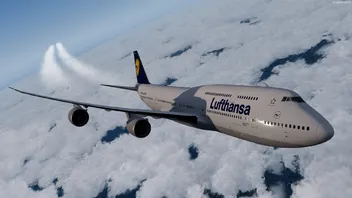

    Ich glaube da sieht man ganz gut was ich meine. Hoffe jemand kann mir da helfen. :)

    Viele Grüße und happy landings

    Niklas

  • Frank
    Team
    Points
    7,437
    Posts
    1,234
    Lexicon Article
    9
    • September 27, 2019 at 11:34 PM
    • Official Post
    • #2

    Hey Niklas,
    update doch mal bitte den Prepar3D-Content auf die aktuellste Version. Danach sollte das Problem behoben sein. Ich gehe nämlich davon aus, dass dein Content noch auf dem Stand Prepar3D v 4.3 oder älter ist. ;)

    Damit die PBR-Texturen korrekt angezeigt werden, reicht es laut PMDG leider nicht aus, nur den Client zu aktualisieren:

    Quote from PMDG

    NOTAM FOR ALL PREPAR3D v4 USERS: As we have been warning for some time, you will need to maintain your Prepar3d installation on the latest update commencing with this update series. If you are already updated to P3D v4.4, but after updating the 747 you notice that the engine pylons are black, and/or the aluminum engine intake inlets or wing leading edges are black in color, this means you must still update your P3D v4.4 CONTENT, not just the CLIENT. Lockheed Martin's initial instructions to users suggested only updating the CLIENT was sufficient in order to use PBR, but in recent days that has been determined to be inaccurate guidance which we anticipate they will update shortly.

    Viele Grüße
    Frank

    fndelogo.jpg

    flusinews.de Redakteur · Moderator


    Mail: flusinews.de Kontaktformular

  • niklas45
    Was already active
    Points
    291
    Posts
    45
    Name
    Niklas
    Flight Simulator
    Prepar3D v4
    • September 28, 2019 at 9:16 AM
    • #3

    Aah super danke! ? ja stimmt das macht Sinn!

Participate now!

Don’t have an account yet? Register yourself now and be a part of Flusiboard!

Register Yourself Login
- Ad -

Who was online today

Users Viewing This Thread

  • 1 Guest

styleLogo-7129d7fe3ac3ce4456f010930db86abe96525a8e.png

Started in November 2011 as a pure forum for our portal flusinews.de, Flusiboard has grown more and more. Meanwhile it has become an independent portal with a community, downloads, a Lexicon and much more.

News about Flight Simulation

  • All the News
  • FS2020 News
  • Prepar3D News
  • X-Plane News
  • FSX News

Our Community

  • Forums overview
  • Flight Simulation Forums

More

  • Flight Simulation Lexicon
  • Ticket System
  1. Advertise with us
  2. Privacy Policy
  3. Contact
  4. Legal Notice
Powered by WoltLab Suite™