1. Dashboard
  2. News
  3. Community
    1. Unresolved Threads
  4. Downloads
  5. Blogs
    1. Articles
  6. Lexicon
  7. Members
    1. Recent Activities
    2. Users Online
    3. Team
    4. Search Members
  • Login
  • Register
  • Search
This Thread
  • Everywhere
  • This Thread
  • This Forum
  • Articles
  • Pages
  • Forum
  • Files
  • Lexicon
  • Blog Articles
  • More Options
  1. Flusiboard
  2. Forums
  3. Flight Simulation
  4. Prepar3D, X-Plane and FSX
  5. Aircraft

Socata Ralley MS-893 download funktioniert nicht

    • Prepar3D v4
  • FMW
  • September 1, 2019 at 10:37 PM
1st Official Post
  • FMW
    Was already active
    Points
    303
    Posts
    46
    Name
    Michael Winkler
    Flight Simulator
    Prepar3D v4
    • September 1, 2019 at 10:37 PM
    • #1

    Guten Abend verehrte....

    Vor 2 Tagen erstand ich nämliches Modell für meinen P3D v. 4.5. Nachdem ich einen Bericht im letzten Flusinews zur Socata las, wollte ich sie haben. Ich lud sie herunter. Dann wollte ich installieren. Endstation. Ich machte viele Versuche. Bei der Bestellung wird im Text hingewiesen, daß diese auch mit P3D v. 4+ funktioniert.

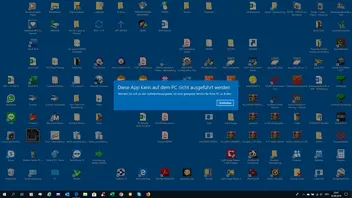
    Es kommt immer ein Insert weiß auf blau:

    "Diese App kann auf dem PC nicht ausgeführt werden. Wenden Sie sich an den Softwareherausgeber um eine geeignete Version für ihren PC zu finden"

    Ich habe auch öfter das Produkt heruntergeladen. Aber nicht änderte sich. Beim Support wird man ja im Auswahlverfahren weitergeführt bis ...nicht passiert.

    Besten Gruß

    Michael Winkler
  • Frank
    Team
    Points
    7,437
    Posts
    1,234
    Lexicon Article
    9
    • September 1, 2019 at 10:41 PM
    • Official Post
    • #2

    Hallo Michael,
    kannst Du mal einen Screenshot von der Fehlermeldung machen?

    Viele Grüße
    Frank

    fndelogo.jpg

    flusinews.de Redakteur · Moderator


    Mail: flusinews.de Kontaktformular

    • Next Official Post
  • FMW
    Was already active
    Points
    303
    Posts
    46
    Name
    Michael Winkler
    Flight Simulator
    Prepar3D v4
    • September 2, 2019 at 11:28 PM
    • #3

    Hier ist er.

  • pidan
    Was already active
    Points
    138
    Posts
    25
    Name
    Daniel
    Flight Simulator
    X-Plane 11
    • September 3, 2019 at 10:48 AM
    • #4

    Vielleicht ist der Installer unglücklich kompiliert worden. Versuch doch mal den Kompatibilitätsmodus von Windows. (Rechte Maustaste, Eigenschaften, Kompatibilität und dann evtl. mal Win 7 probieren).

    Extrem blöde Frage: Du benutzt Win 10 64 bit, oder?

    Viele Grüße

    Daniel

  • FMW
    Was already active
    Points
    303
    Posts
    46
    Name
    Michael Winkler
    Flight Simulator
    Prepar3D v4
    • September 3, 2019 at 11:18 AM
    • #5

    ich benutte Windows 10 - 64 bit.

  • pidan
    Was already active
    Points
    138
    Posts
    25
    Name
    Daniel
    Flight Simulator
    X-Plane 11
    • September 3, 2019 at 11:33 AM
    • #6

    Alles andere hätte mich auch gewundert.

  • Frank
    Team
    Points
    7,437
    Posts
    1,234
    Lexicon Article
    9
    • September 3, 2019 at 12:02 PM
    • Official Post
    • #7

    Vielleicht einfach den Installer nochmal neu herunterladen?

    Viele Grüße
    Frank

    fndelogo.jpg

    flusinews.de Redakteur · Moderator


    Mail: flusinews.de Kontaktformular

    • Previous Official Post
  • FMW
    Was already active
    Points
    303
    Posts
    46
    Name
    Michael Winkler
    Flight Simulator
    Prepar3D v4
    • September 5, 2019 at 8:23 PM
    • #8

    das probierte ich schon etwa 5 x.

    griechischer Gruß

    Michael Winkler

  • Viking01
    Was already active
    Points
    264
    Posts
    51
    • September 5, 2019 at 9:10 PM
    • #9

    Installierst Du als Admin mit Anti-Virus ausgeschaltet?

    Viele Grüße

    Gunter

  • FMW
    Was already active
    Points
    303
    Posts
    46
    Name
    Michael Winkler
    Flight Simulator
    Prepar3D v4
    • September 7, 2019 at 9:27 AM
    • #10

    Lieber Gunter, habe es wieder probiert als Administrator und NORTON Antivirus sowie Firewall ausgeschaltet.

    Nichts zu machen, es kommt immer das gleiche weiss auf blaue Insert.

  • Viking01
    Was already active
    Points
    264
    Posts
    51
    • September 7, 2019 at 9:30 AM
    • #11

    Seltsam, da weiß ich auch nicht weiter.

    Viele Grüße

    Gunter

  • CFlyer95
    Was already active
    Points
    156
    Posts
    23
    Name
    Christian
    Flight Simulator
    Prepar3D v4 X-Plane 11
    • September 7, 2019 at 2:59 PM
    • #12

    Ist das so eine Datei welche eine Graue Box (?) als Icon hat? Die kann man, soweit ich weis, ohne ein anderes Programm gar nicht ausführen/installieren??

    Grüsschen Christian

    Intel Core i7 CPU @ 3.60 GHZ | NVIDIA GTX 1070 | 32 GB DDR4 RAM | ASUS X-99 Mainboard | 1 TB + 256 GB Samsung Pro SSD |2 TB WD Blue HDD

  • FMW
    Was already active
    Points
    303
    Posts
    46
    Name
    Michael Winkler
    Flight Simulator
    Prepar3D v4
    • September 9, 2019 at 6:48 AM
    • #13

    Nein keine graue Box.

  • pidan
    Was already active
    Points
    138
    Posts
    25
    Name
    Daniel
    Flight Simulator
    X-Plane 11
    • September 9, 2019 at 10:29 AM
    • #14

    Wie heisst deine Installer Datei? AH_product_p3d_64bit_version.exe?

  • FMW
    Was already active
    Points
    303
    Posts
    46
    Name
    Michael Winkler
    Flight Simulator
    Prepar3D v4
    • September 9, 2019 at 7:15 PM
    • #15

    AH_MS893_PRDV4PBR_v1.0a

Participate now!

Don’t have an account yet? Register yourself now and be a part of Flusiboard!

Register Yourself Login
- Ad -

Who was online today

styleLogo-7129d7fe3ac3ce4456f010930db86abe96525a8e.png

Started in November 2011 as a pure forum for our portal flusinews.de, Flusiboard has grown more and more. Meanwhile it has become an independent portal with a community, downloads, a Lexicon and much more.

News about Flight Simulation

  • All the News
  • FS2020 News
  • Prepar3D News
  • X-Plane News
  • FSX News

Our Community

  • Forums overview
  • Flight Simulation Forums

More

  • Flight Simulation Lexicon
  • Ticket System
  1. Advertise with us
  2. Privacy Policy
  3. Contact
  4. Legal Notice
Powered by WoltLab Suite™